The Asylum Mod

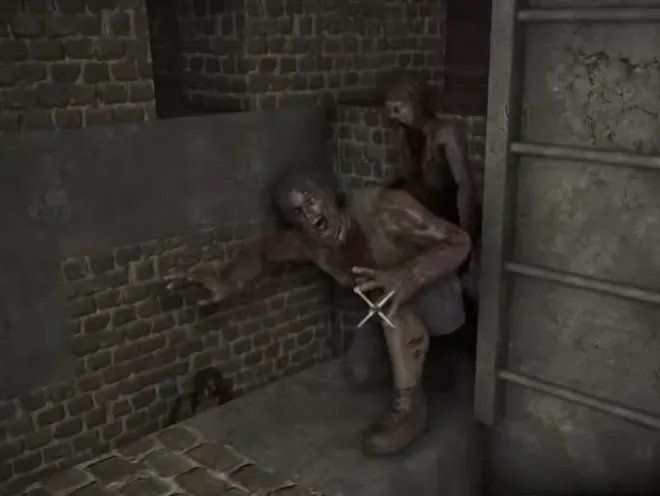
The Asylum is the horror-overhaul for 7 Days to Die. Built and maintained by the Asylum team, the mod swings the tone hard toward classic-slasher horror, intense visual and audio cues, more aggressive zombies, custom horror POIs, and a darker atmosphere than vanilla's "post-apocalyptic but bright" baseline. It's not for the faint of heart, but it's also one of the most distinctive thematic overhauls in the 7DTD scene.
What you're actually fighting
The Asylum's bestiary leans into specific horror archetypes, community discussion regularly calls them out by name. The actual menagerie you'll run into:
- Cenobytes, Hellraiser-inspired tier
- Springwood Slashers, Freddy-style horde tier
- Gremlins, fast-moving small-mob threats
- Giant bugs, heavy melee tier
- Dolls, classic-horror small adversaries
- Clowns, yes, really
- Custom asylum-themed boss tier at scripted POI events
So when you read about the Asylum mod in passing and hear "slasher zombies", these are the actual creature names you should expect. Day 7 horde nights have previously shipped with bugged-high-HP loot-goblin events (~30,000 HP single targets); current builds have addressed most of these, but the Asylum's balance sits firmly on the harder end.
Tonal warning: The Asylum is polarizing on purpose. Players who came for survival mechanics sometimes bounce off the horror layer, and that's a reasonable reaction, the mod is intentionally not for everyone. If your community is mostly base-building / vanilla-survival oriented, Wasteland or War of the Walkers will land better. If your community wants atmospheric dread + scripted scares, the Asylum is unique in the 7DTD scene.
Origins and design intent
The Asylum team's design thesis: 7 Days to Die has all the genre ingredients of horror, zombies, isolation, night-time fear, base-defense, but vanilla doesn't lean into them. The Asylum cranks the horror dial up. Audio cues are creepier; visuals are darker; specific POIs carry slasher-themed scripted encounters. The mod is now on the 3.0.x line; the current build we can confirm from the player base is 3.0.1.
Gameplay Features
- Horror-themed atmosphere, darker lighting, custom audio, environmental dread
- Custom slasher zombie variants, beyond vanilla's roster, with unique attack patterns
- Asylum-themed POIs, psychiatric hospitals, abandoned mental institutions, scripted-event buildings
- Boss-tier slasher encounters at endgame POIs
- Audio-driven scares, sound design that builds tension
- Custom weather effects, fog, blood-moon variations, eerie ambient conditions
Survival realism
The Asylum is medium realism, it's about atmosphere and fear, not about granular survival mechanics. Vanilla 7DTD's survival systems (food, water, temperature) are preserved. The mod's contribution is psychological and aesthetic. Combat feels tighter because the threats feel more frightening, even if their underlying damage curves aren't dramatically harder than vanilla.
Quality-of-life enhancements
- Improved horror-themed UI
- Cleaner POI signposting for asylum-themed locations
- Atmospheric audio settings exposed in panel
- Better tooltips on horror-specific gear
- Custom inventory icons that fit the tone
New challenges and enemies
The Asylum expands the threat roster meaningfully:
- Slasher-tier zombies with unique attack patterns and audio cues
- Scripted POI events, entering specific buildings triggers scenes that change combat dynamics
- Boss-tier asylum bosses at endgame encounters
- Custom horde nights with horror-themed pacing
Crafting and workstations
The Asylum's crafting additions are thematic rather than systemic:
- Custom horror-themed weapon variants
- Themed gear and apparel
- Atmospheric items (radios, recordings, journal entries)
- The mod doesn't dramatically expand the crafting tree the way DF or UL do
Legal and use conditions
The Asylum is free to use for community servers. The Asylum team distributes the mod via the 7D2D Mod Launcher v5 and community channels. XML and gameplay logic are freely available; custom audio, scripted-event content, and themed assets carry community-license terms, point your players at the launcher source.
Content advisory: The Asylum is built around intense slasher / horror content. It's not appropriate for all audiences. Communities should be intentional about adopting it.
Asylum installs one-click on Plan L and XL.
Recent updates
Updated 4 October 2026. The Asylum team's current release is 3.2.2f, published on 23 September 2026 and built for game V3.2: their install steps tell players to leave Steam's beta branch on None, which meant V3.2 until V3.3.0 became the default build on October 5, 2026. Until the team ships a build for 3.3, pick v3.2.0 in Steam's Betas tab instead, so the game matches a V3.2 server. The 3.2 line arrived on 15 September and has had three fix releases since. We host it as a one-click install on Plans L and XL, as Asylum 3.2.2 on game V3.2. The earlier 3.0.1 build on game V3.0 is no longer offered for new installs; servers already running it keep it. The team's changelog asked for a fresh save when the mod moved to 3.0.1, so plan a new world when you change builds.
If Asylum 3.0.1 freezes or stutters
This was the most common complaint about the 3.0.1 build, and there is a known community fix. The 3.2 pack no longer ships the folder in question, so this section applies to 3.0.1 servers only. Players report the whole server hitching for up to half a minute, often when harvesting mod plants. The fix that has worked for multiple people is to delete the Mods\7Days_Addressables folder from the install. One player confirms it "applies only for 3.0.1", so treat it as specific to this build rather than a permanent part of the setup. The mod has an active Discord and that is where fixes surface first, ahead of any wiki.
Note that heavy content is the trade-off here by design: the mod packs in an enormous amount of enemies, weapons, vehicles and custom assets, and several players attribute the stutter to exactly that. If your group is sensitive to frame pacing, this one is worth a trial run before committing a season to it.
The fix releases on the 3.2 line, from the team's changelog:
- 3.2.1 (17 September): airdrop rendering, the empty glass jar recipe, the food skill screen, club damage, and a larger 240 m radius around scrolls. It needed a full re-download but not a new world
- 3.2.2 (19 September): ammo and forge recipes that could not be crafted, perks that did not apply to custom tools, a crash caused by mechs, and safeguards on bosses for lower-end systems
- 3.2.2f (23 September): a memory leak in the spells and a drone lock bug
How to install The Asylum
For self-hosters: install via the 7D2D Mod Launcher v5. Search for "Asylum", install. Distribute the same client bundle to all players.
For dedicated servers: install the matching server bundle. Both server and client must run identical Asylum builds.
If you're hosting with Supercraft, we pre-install The Asylum at the recommended 7DTD core version. Your players just need the matching client bundle from launcher v5.
Useful links
Related mod pages
Skip the setup - host your 7DTD server with us
Plan M ($9.99/mo) covers 16-player groups with mods one-click and 5 datacenter regions. 2-day money-back, no contract.
Stay in the journey
Mods & overhauls hub
Explore the most popular 7D2D modpacks, install guides, and tooling, all tied back to hosting that supports one-click installs.
More ways to get answers