Teragon World Generator for 7 Days to Die
No install needed? Generate a 7DTD world online with xegen and download it in about a minute.
Teragon is the only desktop world generator for 7 Days to Die still being developed. KingGen and NitroGen are both abandoned and never reached the 2.x or 3.x game versions, which leaves three live routes to a world: stock RWG in the game, xegen in the browser, and Teragon on your desktop. Pick Teragon when you want more control than stock RWG and are willing to learn a command stack for it. It is especially strong on rivers, coastlines, custom POIs, district planning, and repeatable presets.
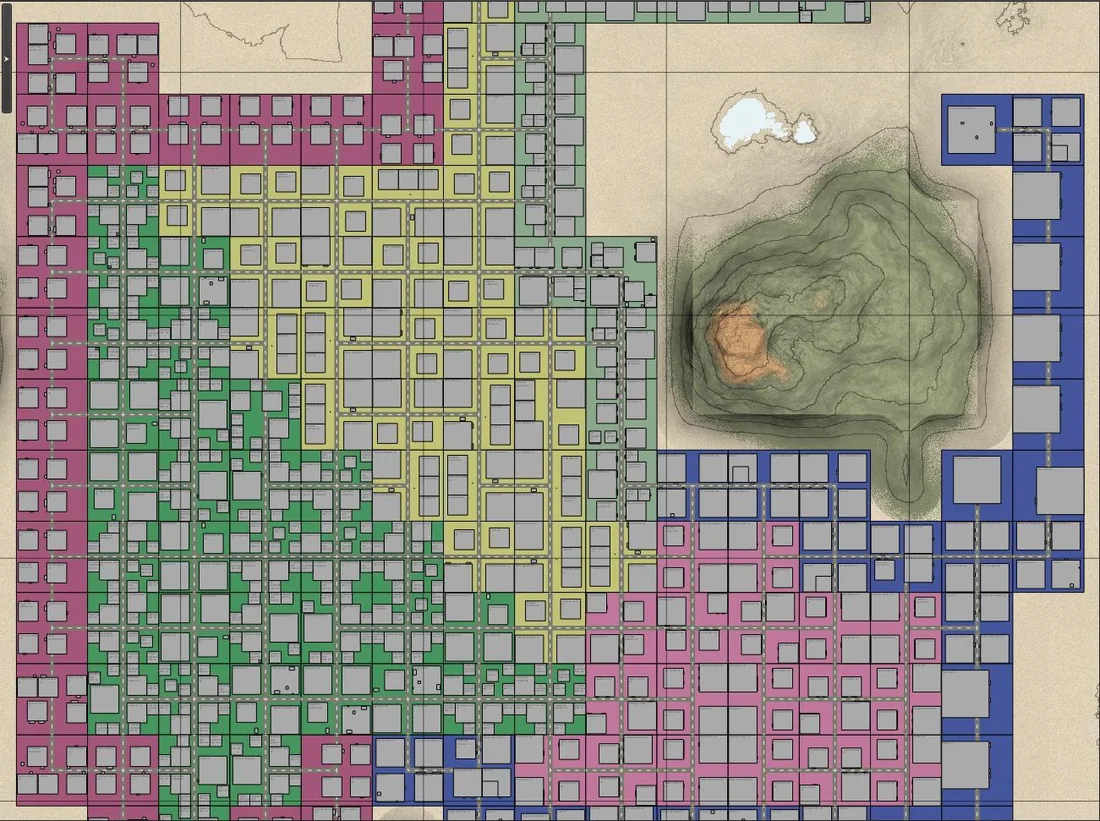

Why people pick Teragon over stock RWG
- You can shape terrain and water more deliberately instead of hoping RWG lands in the right place.
- You get better control over districts, tiles, highways, rivers, and coastlines.
- It is practical for server-grade custom POI workflows, not just solo seed experiments.
- The community has built a habit of sharing presets, tutorials, and troubleshooting in one place instead of scattering it across dead forum posts.
The most useful documented workflow
One of the clearest pieces of community guidance comes from forum posts explaining how to add your own POIs. The short version:
- Create a POI property list for the prefabs you want to add.
- Import that property list in Teragon's expert workflow.
- Add the source path that contains your prefabs, parts, and tiles, and make sure those commands run before Create POI.
Quickstart for a first serious world
- Start with a reusable preset instead of editing defaults directly.
- Generate a smaller draft world first, then move to 8K or 10K when the layout is close.
- Preview biome flow, coastlines, and road routes before the full export.
- If rivers or shorelines look too extreme, revisit water level and terrain settings before regenerating.
- Export into
GeneratedWorlds, then test trader access, road continuity, and spawn quality before declaring the map finished.
What usually goes wrong
How to build a map that supports biome progression
7 Days to Die added biome progression in V1.0 and expanded it in V2.0, and it is still there on V3.3. If you want biome hazards on your server, the map itself needs traders, towns and the biome layout arranged so players can progress through the biomes in the canonical order: forest, burnt forest, desert, snowy forest, wasteland. Teragon supports this with the preset edits below.
On the server side, the switch moved. BiomeProgression used to be a property in serverconfig.xml. V3.0 removed it from that file along with 29 others and turned it into a sandbox option, so a V3.3 server ignores it if you add it to the config. Set it through a SandboxCode before the world is created, or with setgamepref BiomeProgression true on a running server. The map work below is what makes that setting playable.
Step 1: pin each trader to their canonical biome
In your Read POI Property List command, find the trader rows (usually near the bottom of the default presets) and append a ;biome:<name> tag to the end of each line. The canonical TFP mapping is:
- Trader Rekt →
;biome:forest - Trader Jen →
;biome:burnt - Trader Bob →
;biome:desert - Trader Hugh →
;biome:snow - Trader Joel →
;biome:wasteland
Step 2 (optional): assign town types to specific biomes
If you skip this step the map will scatter regular_town, small_town, and oldwest_town randomly, which often leaves one biome stuffed with large cities and another with only small towns. To get large cities in every biome (or to make Old West towns desert-only, large-cities-only wasteland, etc.) copy each town row in Read Town Property List once per biome and append ;biome:forest / ;biome:burnt / ;biome:desert / ;biome:snow / ;biome:wasteland. Prefix the town label with the biome name (e.g. forest_regular_town) to keep the preset readable.
Step 3: use a progression-compatible biome map
Disable Create Directional Environmental Biome Map and add Create Directional Biome Map instead. The directional biome map lays biomes out in a fixed order, which is what biome hazards need so players are not forced to cross wasteland just to reach burnt forest. Layout options include stripes (west-to-east or south-to-north), circles, asteroid, diagonal, curved, pie chart, and pie chart with center biome. Whichever layout you pick, set the biome order in the command's biome list to forest, burnt forest, desert, snowy forest, wasteland.
Step 4: link the biome map to Create Towns
In the Create Towns command, set the Biome Map Name parameter to whatever name your directional biome map uses (the default is my biome map). If this field is empty, Create Towns ignores the biome map entirely and all of your trader and town biome assignments quietly fail to take effect.
Repopulate Tiles: change POI on a finished map without regenerating
The Repopulate Tiles command (added in Teragon 0.52.12 and still in the current 0.52.30 build) lets you change POI on tiles of an already-generated map. You do not have to regenerate from scratch when you add a new POI pack, when a 7DTD update introduces new POI, or when you want a familiar map with a fresh set of buildings. The command works on any Teragon-generated map and on the pregen maps that ship with 7 Days to Die, but it does not work on Navezgane (the water map import fails).
Workflow
- Use the World Previewer preset to load the existing map.
- Add the
Repopulate Tilescommand. Best to run it individually rather than as part of the full preset. - Choose a Selection Mode:
- Tile At Position: change POI on a single tile. Hover your mouse on the tile in the preview, CTRL-C to copy the position, paste into the command's Position field.
- Town At Position: change POI in an entire town. Wilderness POI outside that town stay put.
- All Tiles: change every tile on the map. Position is ignored. Wilderness POI and region POI are unaffected.
- Optionally add a POI Wish List (comma-separated POI names) to bias placement toward POI you want on the map.
- Hit Run on the command (not on the preset, or you will regenerate the whole world).
- Update the preview to see the new POI placements.
Restrictions to know
Repopulate Tiles exposes a long list of restriction toggles. Defaults are usually correct, but a few are worth knowing:
- Elevation restrictions: leave enabled. Disabling can cut off the top or bottom of POI that do not fit the chosen height.
- Game version restrictions: leave enabled unless you are intentionally crossing versions.
- Distance to duplicate: disable if you want a specific POI (for example, an extra trader) placed near an existing duplicate.
- Use max spawn count: disable to exceed a POI's normal cap on the map.
- Biome restriction: only effective if the Biome Map Name is also filled in (typically
my biome map). - Permissive Size Check for Wish List POIs: usually leave off; otherwise a 25x25 POI can land on a 100x100 slot and look wrong.
Use cases for server admins
- Replay a familiar map with fresh POI. Town locations and terrain stay the same, but the buildings inside the towns change. Same map, new game.
- Adopt a new POI pack mid-season. Add the new pack's source path, run Repopulate Tiles with All Tiles, and the new POI appear without rebuilding the map.
- Pick up new game-version POI. When 7DTD ships a content patch that adds POI, Repopulate Tiles brings them into your existing world.
- Force a stubborn POI onto a tile. Especially useful for 100x100 cap-tile POI (industrial cap, downtown cap) that rarely land where you want them. Pick the cap tile, set Wish List to the target POI, run.
Who should use Teragon
- Server admins: yes, especially if you want curated wipe maps.
- Map hobbyists: absolutely, if stock RWG feels too opaque.
- Players who only want "one random world tonight": stock RWG is simpler, and xegen is faster and gives you a preview before you download.
- Former KingGen and NitroGen users: both tools are abandoned and neither works with current 7D2D. Teragon is the desktop successor; xegen is the no-install one.
- Anyone on a machine with under 16 GB of RAM: Teragon asks for 16 GB minimum and large maps go well past it. Generate in the browser instead.
Where to get it and where to learn it
Teragon has no public download page. It is distributed through its official Discord, which is also where help, presets and shared worlds live. Riamus maintains a free tutorial video series on YouTube under the handle @riamus_1, and the written documentation runs past 300 pages.
- Teragon Discord, the only official download
- Using Teragon, our mirror of the written documentation
- xegen, generate a scored world in the browser instead
- Download community maps
Skip the setup - host your 7DTD server with us
Plan M ($9.99/mo) covers 16-player groups with mods one-click and 5 datacenter regions. 2-day money-back, no contract.
Stay in the journey
Worlds, maps and generators
Pick a generator, build the world, then get it onto a server: the comparison, both live tools, finished maps, seeds and the settings code that goes with them.
More ways to get answers