CSMM (Catalysm's Server Manager) for 7 Days to Die
CSMM is the open-source web admin panel for 7DTD dedicated servers. Watch players on a live map, run scheduled commands, bridge chat to Discord, manage bans and an in-server economy. CSMM is community-built and free. Point it at your 7d2d.net server's telnet port, drop Allocs Server Fixes in via FTP or the mods panel (Plan M and up), and the live map, scheduler and Discord bridge are yours.
Admin journey
Where CSMM fits
Set game settings, upload maps/mods, then monitor and automate here.
Set & test
Tune serverconfig.xml, restart, verify console logs. Since V3.0, gameplay settings live in the in-game Sandbox + a SandboxCode, not individual serverconfig.xml properties.
Upload safely
Use FTP for large worlds/modlets, then set GameWorld/GameName.
Automate & monitor
Schedule commands, track players, keep admins connected.
Catalyst's Server Manager & Monitor (CSMM) keeps eyes on your 7DTD server from anywhere. Track players, push scheduled commands, blacklist troublemakers, and manage multiple servers with one web UI.
- Server automation: scheduled commands, server messages, auto-saves.
- Discord notifications: alerts for events and custom string detection.
- Map viewer + player intel: see positions, give items, handle bans.
CSMM highlights
Run CSMM when you need automation beyond the panel and a bird’s-eye view of your world.
Scheduled tasks
Queue restarts, broadcasts, and cleanup commands.
Discord hooks
Keep staff in sync with real-time alerts and triggers.
Admin tools
Kick/ban, give items, and monitor pings from one place.
Map viewer
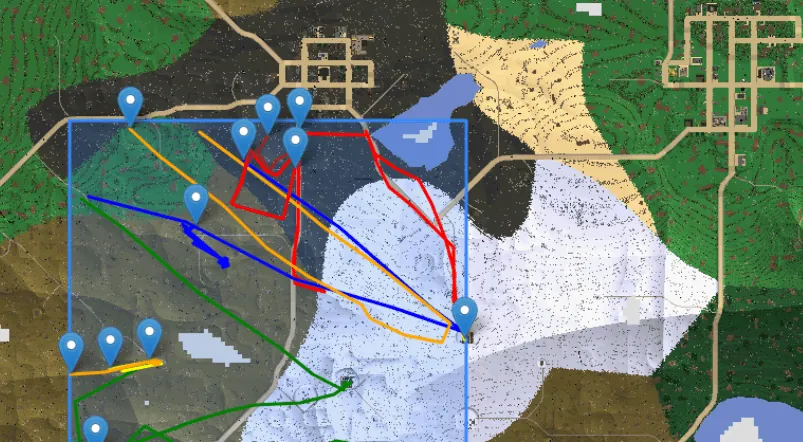
Track movement, trader visits, and base locations visually.
Plan M and up
CSMM-ready: FTP, mods panel, telnet
Get a managed server with daily backups, low ping, and everything CSMM needs: upload Allocs Server Fixes, connect over telnet.
Allocs Server Fixes go in with one drop via FTP or the mods panel (Plan M and up).
What can CSMM actually do? (top 6 admin tasks)
- Schedule a daily restart at 4 AM - Tasks → New → cron
0 4 * * *→ commandshutdown. Avoids the rare memory-leak crashes seen on long-running 2.x / 3.0 servers. - Auto-message players - broadcast a tip every 15 minutes, or push a server-rules nag to anyone connecting for the first time.
- Discord raid alerts - wire a webhook to fire when a horde-night warning appears, or when a specific player joins/leaves. Tasks → Triggers → chatLine matches.
- Give items / teleport players - bypass the in-game admin menu. Players page → right-click → Give item or Teleport. Logs every action for audit.
- Map viewer with player intel - see who's near whose base, where traders are, and where bloodmoon hordes spawned. Map page is generated from
regionfiles via Allocs Server Fixes. - Ban / kick / whitelist sync - central list across multi-server estates. Edit on one server, push to all.
CSMM vs raw 7DTD admin tools
| Task | Vanilla telnet/console | CSMM |
|---|---|---|
| Scheduled restart | cron + shell script + telnet | One UI form |
| Player position visibility | None (debugmenu in-game only) | Live map viewer |
| Discord notifications | Not possible | Built-in webhook triggers |
| Multi-server admin | Separate telnet sessions | One dashboard |
| Audit log of admin actions | Manual tail of server log | Per-admin action history |
| Cost | Free (manual labor) | Free (community-maintained) |
CSMM is the open-source CatalysmsServerManager project - battle-tested across hundreds of community servers since 2018.
Pairing CSMM with modded servers? Check the 7DTD Mod Compatibility Matrix → — server-safe verdict + Mod Launcher status for the top 17 mods, including all the major overhauls.
Frequently asked
What is CSMM?
CSMM (Catalysm's Server Manager & Monitor) is a free, open-source web-based dashboard for 7 Days To Die server administration. It connects to your server via telnet + Allocs Server Fixes and provides scheduled commands, Discord webhooks, player tracking, and a live map viewer. Built by the 7DTD community and maintained on GitHub.
Is CSMM free?
Yes. CSMM is fully open-source (MIT license) and free. Run it wherever you like (the official Docker image fits on any small VPS) and connect it to your server over telnet.
How do I connect my 7DTD server to CSMM?
You need three things: server IP, telnet port (default 8081), and telnet password (set in serverconfig.xml). Open your own CSMM instance, click "Add Server", enter the credentials. CSMM verifies the connection and pulls map data via Allocs Server Fixes (upload them via FTP or the mods panel on Plan M and up). Total setup: ~3 minutes once Allocs is in place.
Does CSMM work with mods like Darkness Falls or Undead Legacy?
Yes - CSMM is mod-agnostic. It interacts with telnet, not the modded game logic. The map viewer reads region files regardless of overhaul. Our one-click packs (Darkness Falls, Asylum, War3zuk, Undead Legacy) are all CSMM-compatible.
CSMM vs BattleMetrics or other 7DTD tools?
BattleMetrics focuses on player rankings + community discovery (similar to GameTracker). CSMM is the admin power tool - automation, scheduling, in-server actions. Many communities run both: BattleMetrics for player listings, CSMM for actual server management.
Can CSMM crash my server or eat performance?
No. CSMM only sends telnet commands; it doesn't run in-game. Map viewer reads region files asynchronously. The single performance impact is the telnet poll rate (every ~30 seconds by default), which is negligible.
Which Supercraft plans include CSMM?
CSMM connects to every 7d2d.net plan over the telnet port shown on your server's Details page. For the live map add Allocs Server Fixes through FTP or the mods panel, available from Plan M up.
Where do I report a bug or request a CSMM feature?
CSMM is community-maintained at github.com/CatalysmsServerManager/7-days-to-die-server-manager - file issues there. For anything about connecting CSMM to your 7d2d.net server (ports, telnet password, Allocs upload), open a ticket via /contact.
Next steps
Stay in the admin cluster: switch between commands, settings, FTP, and telnet without leaving the site.